
Reverse engineering in Fusion: align scanned meshes and fit datum planes to scanned faces, with a robust fit that ignores scanner noise.
Ingeniería inversa en Fusion: alinea mallas escaneadas y crea planos de apoyo sobre caras escaneadas, con un ajuste robusto que ignora el ruido del escáner.
English
Reverse engineering a scanned part in Fusion starts by putting it where it belongs: a mating face flat on the XY plane, a machined face parallel to the origin. Everything you build afterwards — sketches, sections, dimensions — inherits that first alignment.
But a scanned flat face is thousands of noisy triangles, and an alignment made from three hand-picked points inherits the noise of those three points. AlignMesh Pro fits the plane to the face itself: you click 3 rough points, the add-in reads the mesh vertices around them, discards outliers with a RANSAC fit refined by the median, and computes the plane that really represents that face.
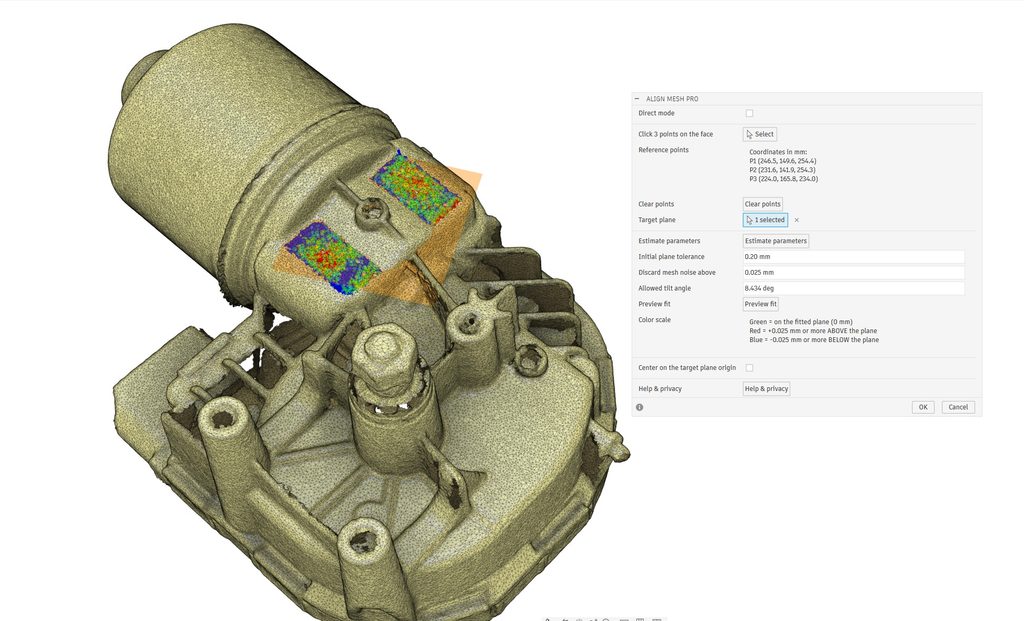
Two commands, one robust fit
- Align Mesh Pro — aligns the mesh to any plane: the origin XY, XZ, YZ or any construction plane. The result is a single Move feature in the timeline. No component, no duplicated mesh.
- Fit Plane to Mesh Pro — creates a construction plane fitted to a scanned face, without moving anything: the datum you need to sketch on, measure from, or section through.
What makes it different
- See the deviation before anything moves. «Preview fit» colours the whole face by its real distance to the fitted plane — green on the plane, red above, blue below — with the scale in millimetres.
- Tolerances adapted to your scan. «Estimate parameters» suggests the three tolerances for that specific part. You can adjust them by hand and preview again.
- Direct mode. Tick one box and the add-in runs on its own as soon as it has the 3 clicks and the target plane.
- Large meshes. Works on scans of millions of triangles.
- Your language. Interface in English and Spanish, following your Fusion language.
Requirements
- Autodesk Fusion on Windows.
- Signed in to Fusion with the Autodesk account you used to get the add-in, and online at least once every 14 days for the licence check.
Get it
Available on the Autodesk App Store:
Documentation and support
- The user guide (PDF, English and Spanish) is included with the add-in and opens from the «Help & privacy» button in both dialogs.
- Support: info@norbertrovira.com — in English or Spanish. Usual reply within two working days.
- Privacy policy
Español
Reconstruir una pieza escaneada en Fusion empieza por ponerla donde toca: la cara de unión apoyada en el plano XY, la cara mecanizada paralela al origen. Todo lo que construyas después — bocetos, secciones, cotas — hereda esa primera alineación.
Pero una cara plana escaneada son miles de triángulos con ruido, y una alineación hecha con tres puntos clicados a ojo hereda el ruido de esos tres puntos. AlignMesh Pro ajusta el plano a la propia cara: clicas 3 puntos aproximados, el add-in lee los vértices de la malla que hay alrededor, descarta los que se salen con un ajuste RANSAC refinado por la mediana y calcula el plano que de verdad representa esa cara.
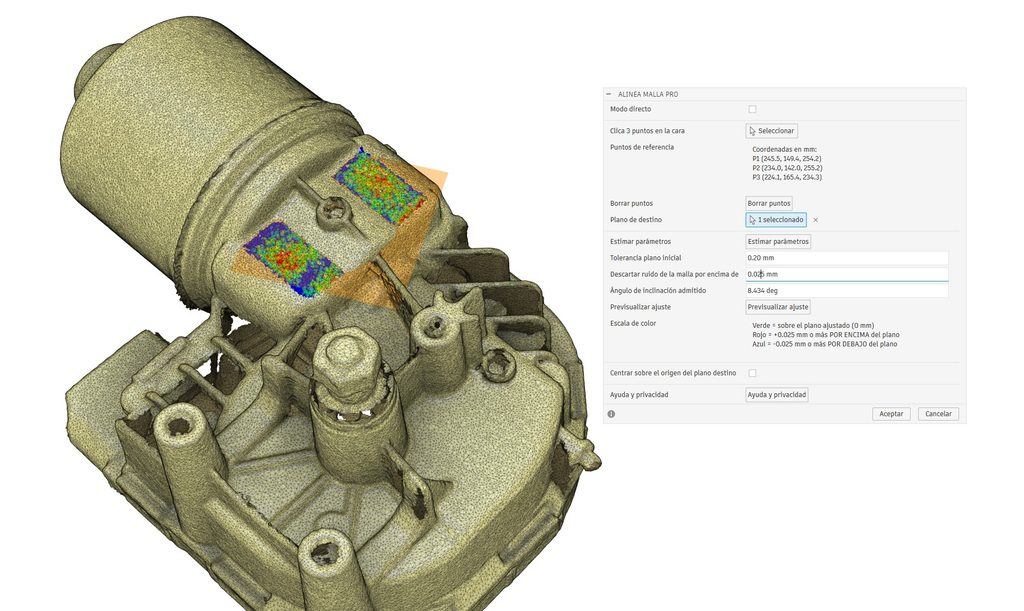
Dos comandos, el mismo ajuste robusto
- Alinea Malla Pro — alinea la malla a cualquier plano: el XY, XZ o YZ del origen, o cualquier plano de construcción. El resultado es una única operación Mover en la línea de tiempo. Sin componente y sin duplicar la malla.
- Plano en malla Pro — crea un plano de construcción ajustado a una cara escaneada, sin mover nada: el plano de apoyo que necesitas para dibujar encima, acotar desde él o seccionar.
Qué lo hace diferente
- Ves la desviación antes de mover nada. «Previsualizar ajuste» colorea toda la cara según su distancia real al plano ajustado — verde sobre el plano, rojo por encima, azul por debajo — con la escala en milímetros.
- Tolerancias adaptadas a tu escaneo. «Estimar parámetros» propone las tres tolerancias para esa pieza concreta. Puedes cambiarlas a mano y volver a previsualizar.
- Modo directo. Marcas una casilla y el add-in se ejecuta solo en cuanto tiene los 3 clics y el plano de destino.
- Mallas grandes. Funciona con escaneos de millones de triángulos.
- Tu idioma. Interfaz en español e inglés, según el idioma de Fusion.
Requisitos
- Autodesk Fusion en Windows.
- Sesión iniciada en Fusion con la cuenta de Autodesk con la que obtuviste el add-in, y conexión a internet al menos una vez cada 14 días para comprobar la licencia.
Cómo conseguirlo
Disponible en la Autodesk App Store:
Documentación y soporte
- La guía de uso (PDF, español e inglés) va incluida con el add-in y se abre con el botón «Ayuda y privacidad» de los dos diálogos.
- Soporte: info@norbertrovira.com — en español o inglés. Respuesta habitual en dos días laborables.
- Política de privacidad
Scans in the video and images: Motorcycle upper triple clamp and Motorcycle Crankcase by Artec 3D (artec3d.com), CC BY 4.0.